Sniffnet
- Introduction
Sniffnet is an application designed to help you comfortably monitor your Internet traffic across multiple operating systems. It emphasizes simplicity, reliability, and cross‑platform accessibility, making it suitable for both casual users and power users who want deeper insight into what travels across their network.
The project is fully open‑source, inviting collaboration, feedback, and contributions from a global community of developers and users. Its ongoing development is supported by a community of sponsors and partners who share a passion for transparent network monitoring.
The header imagery below visually introduces Sniffnet’s branding and purpose, serving as a gateway into a feature-rich experience that blends clarity with technical depth.

The Sniffnet project highlights its multilingual reach, signaling an inclusive approach to accessibility. Translations span a diverse set of languages, with a promise of many more to come. This multilingual support reinforces the idea that network monitoring should be usable by people around the world, regardless of their preferred tongue.
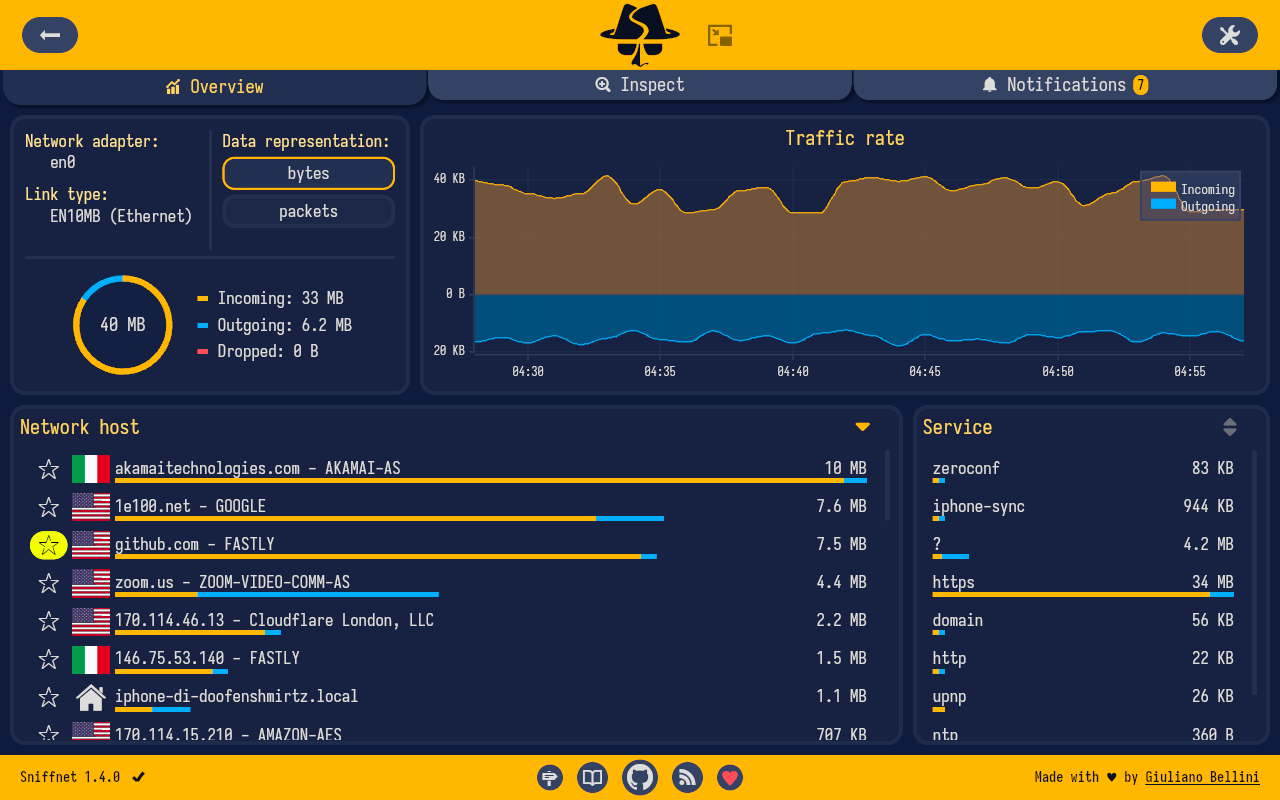
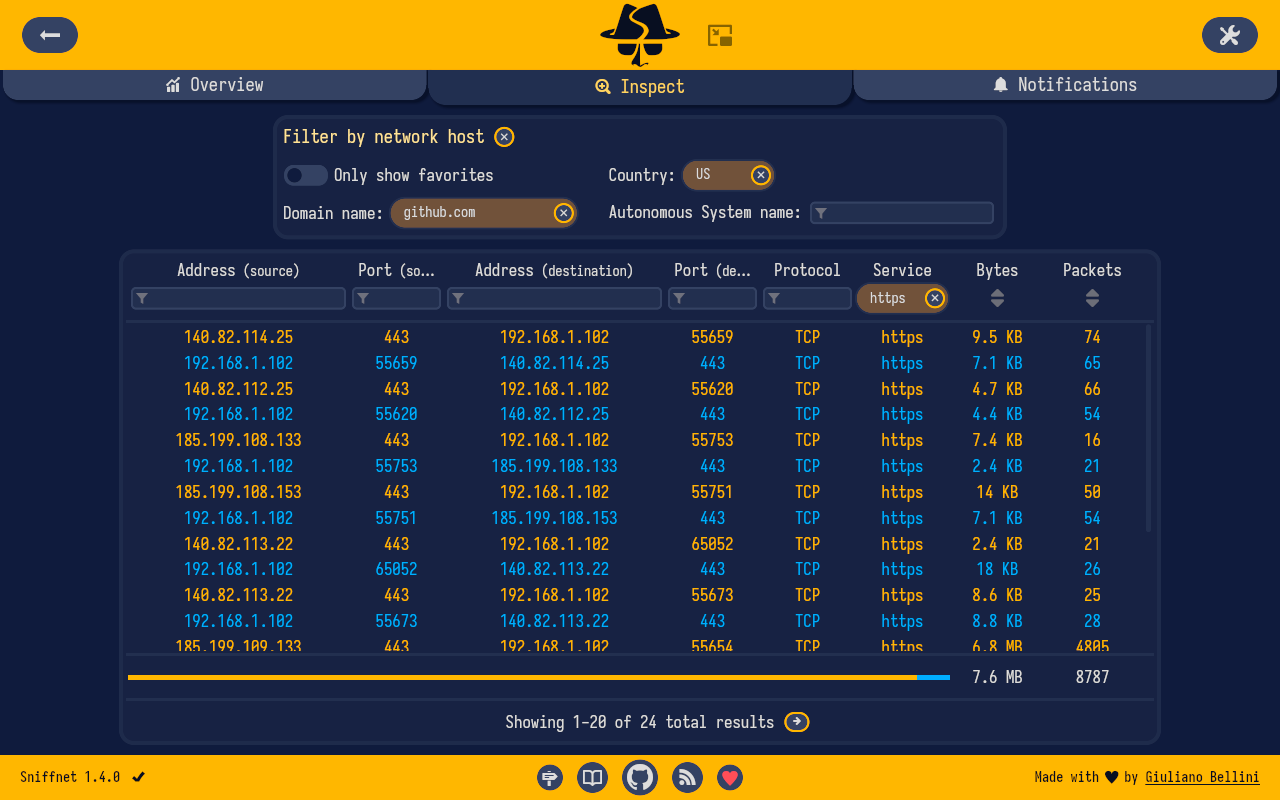
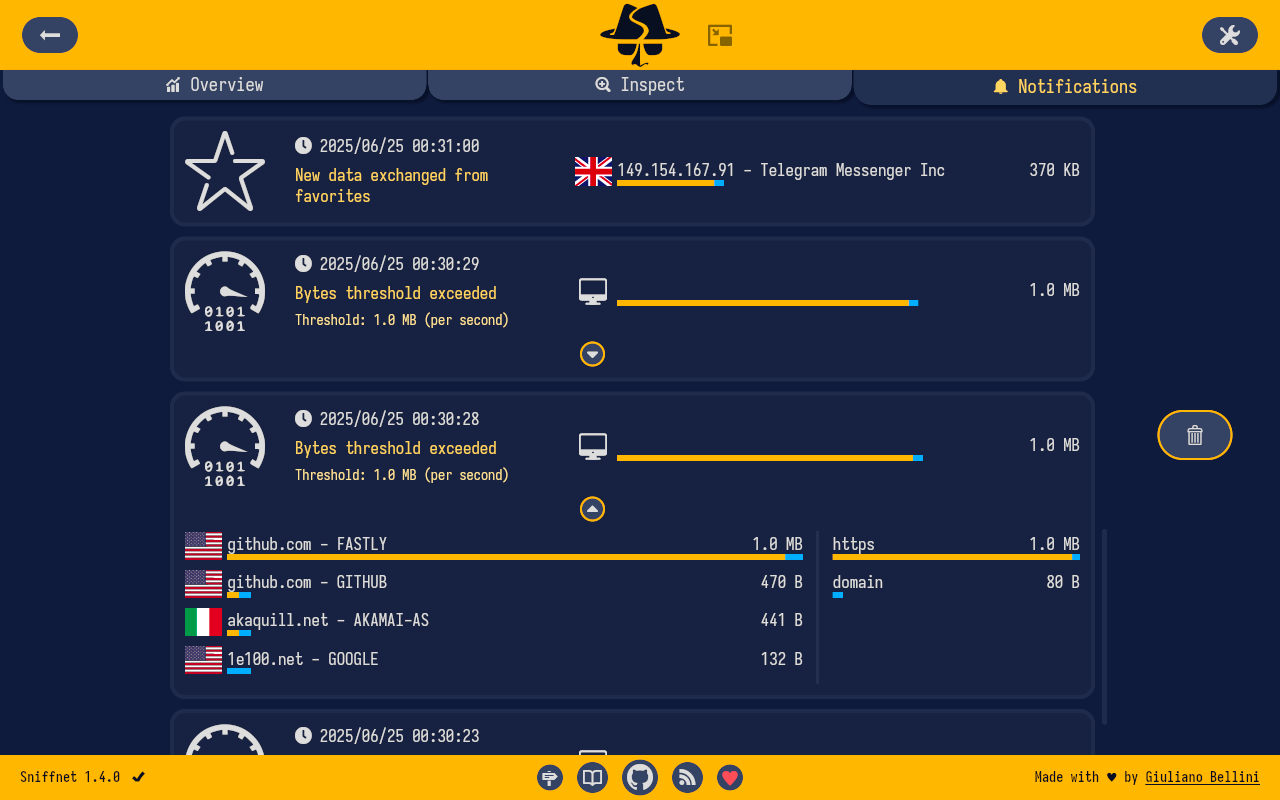
A quick glance at the project’s visual pages and sections is provided through representative screenshots. These images illustrate how Sniffnet presents data and configuration options in a clean, approachable layout:


A horizontal rule image is shown to segment sections visually:

- Visual Tour of Sniffnet
Overview Page: The overview screen serves as the first landing area, offering a macro view of network activity. It emphasizes real‑time data, high‑level statistics, and quick access to the primary controls for filtering and inspection.
Inspect Page: The inspect view dives into the specifics of individual connections, enabling users to examine the particulars of each traffic event. This is where you can zoom in on a particular host, protocol, or application to understand the traffic pattern and relationships.
Notifications Page: Alerts and notifications keep you informed about unusual or user‑defined events. The notifications panel helps you respond quickly when something notable occurs in your traffic stream.
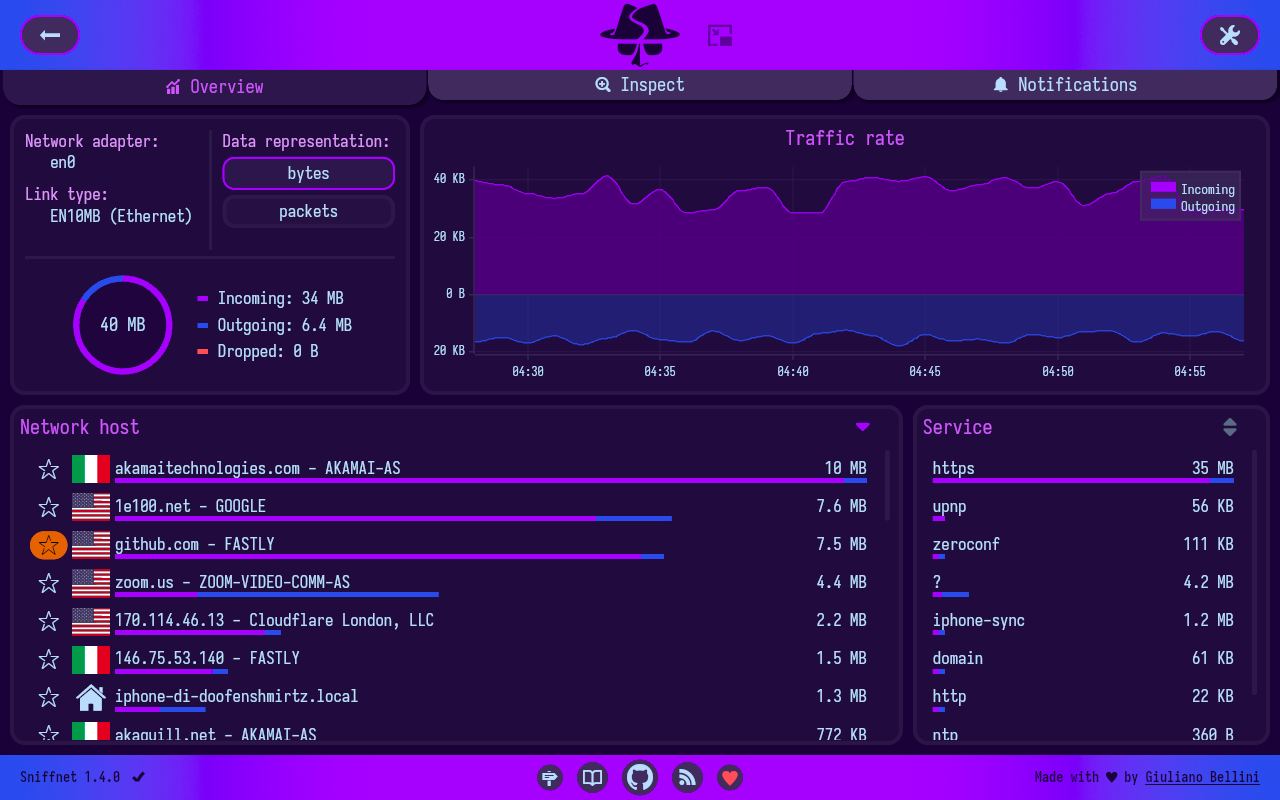
Custom Theme (Deep Cosmos): Sniffnet supports theming and customization, allowing you to tailor the visual appearance to your taste. The deep cosmos theme demonstrates the aesthetic flexibility available to match your preferences or environment.
Thumbnail Mode: A thumbnail presentation mode provides a compact, glanceable view of network activity, enabling quick scanning when screen real estate is limited or when you want a summarized snapshot of traffic dynamics.
Horizontal separators are used throughout the visuals to create clear breaks between major areas of content, ensuring legibility and a clean reading experience:
- How Sniffnet Helps You Monitor Traffic
- Sniffnet is designed to let you select a specific network adapter on your PC to inspect. This targeted approach ensures that you focus on the traffic you care about, without being overwhelmed by unrelated data from other interfaces.
- You can apply a curated set of filters to the observed traffic. Filters enable you to spotlight particular protocols, hosts, or services, reducing noise and making important patterns easier to spot.
- The software supports import and export of comprehensive capture reports as PCAP files. This interoperability enables you to archive, share, or further analyze captured data in other tools.
- Real-time statistics and charts provide an ongoing, dynamic picture of your Internet traffic. Live visuals help you detect spikes, unusual activity, or shifts in usage as they happen.
- Sniffnet includes a local network discovery feature, aiding you in identifying devices that are part of your immediate network, which is especially useful for home networks or small office environments.
- Geographic location data is available for remote hosts, offering a sense of where traffic is coming from or going to, which can be valuable for security awareness and traffic analysis.
- Domain name and ASN (Autonomous System Number) lookups illuminate the identity of the hosts you exchange traffic with, adding context to every connection.
- A database of upper layer services, protocols, trojans, and worms helps you recognize known traffic classes and potential threats, enabling quicker, informed responses to anomalies.
- Sniffnet shows which programs on your system are generating network traffic, helping you correlate activity with running applications.
- You can save your favorite network hosts, services, and programs for rapid recall and ease of monitoring on subsequent sessions.
- The utility is designed to remain informative even when the main application window is minimized, keeping you in the loop without interrupting your workflow.
- A robust search and inspect capability lets you pinpoint and analyze each network connection in real time, supporting a deeper understanding of how data travels through your machine.
- Custom notifications let you set thresholds and events that trigger alerts. This proactive approach helps you catch issues early and respond promptly.
- It is possible to import custom IP blacklists to highlight potentially dangerous connections, strengthening your security posture by visually flagging known bad actors.
- Theming and style customization are supported, including the option to use your own themes. This ensures the tool not only works well but also looks exactly the way you want it to.
- And more: Sniffnet’s feature set continues to evolve as developers add capabilities and the community contributes ideas and improvements.
- Features in Focus
- Network adapter targeting: Choose the exact interface to watch, isolating your monitoring to the data that matters.
- Filterable observation: Apply precise filters to tailor the data stream to your investigative needs.
- Import/export of PCAP reports: Preserve and share capture data for analysis in other environments.
- Comprehensive traffic statistics: View aggregate trends, averages, maxima, and other metrics that summarize your network behavior.
- Real-time traffic charts: Visualize velocity, volume, and intensity as it unfolds.
- Local network discovery: Identify devices within your immediate LAN, improving situational awareness.
- Geolocation of hosts: See where remote endpoints are located geographically to add context to connections.
- Domain and ASN data: Learn who you are exchanging data with and through which networks.
- 6000+ upper layer services and protocols: Recognize a wide spectrum of traffic types, including potential threats.
- Application visibility: Determine which programs generate network traffic on your system.
- Favorites and quick access: Save frequently consulted hosts, services, and programs for faster monitoring.
- Minimized mode continuity: Keep an eye on traffic without keeping the window in the foreground.
- Real-time inspection: Search and inspect every connection as it appears.
- Custom notifications: Create event-driven alerts to stay informed.
- IP blacklists: Highlight and potentially block connections from trusted blacklists you provide.
- Style and theme customization: Personalize the UI, including the option to apply custom themes.
- Ongoing evolution: The project emphasizes continuous improvement, with new features and refinements added over time.
- User Manual, Documentation, and Community Resources
- Sniffnet provides a comprehensive user manual hosted in its Wiki. This resource is designed to help you progress from a basic setup to leveraging the most advanced features.
- The Wiki contains step-by-step guides, usage tips, practical examples, and answers to frequently asked questions. It’s a living resource that expands as new features arrive and as user needs evolve.
- For direct access to the repository’s documentation portal, you can find the Sniffnet Wiki linked from the main project pages.

- Troubleshooting and Support
- Missing dependencies: Many issues stem from system‑level dependencies required to correctly analyze a network adapter. The project maintains a dedicated page with installation guidance tailored to your operating system. Following these instructions helps ensure Sniffnet can parse traffic accurately.
- Reference: Required dependencies guide
- Rendering problems: On older architectures or with outdated graphics drivers, the wgpu renderer used by the iced GUI library can exhibit glitches, color gradient limitations, or icons appearing as black. A reliable workaround is to switch to a CPU‑based software renderer.
- Quick fix: Set the environment variable ICEDBACKEND to tiny-skia. Example: ICEDBACKEND=tiny-skia
- When in doubt or facing persistent issues, do not hesitate to open an issue on the project’s issue tracker. The maintainers and community are ready to help investigate problems and propose solutions.
- The troubleshooting section emphasizes proactive collaboration with the community, encouraging users to share details about their system, hardware, and the exact steps that lead to the issue.
- Acknowledgements, Sponsors, and Community Support
Sniffnet is a freely available, open‑source project whose development relies on the generosity and effort of many contributors. Acknowledging these efforts helps sustain long‑term growth and improvement.
The graphical user interface is built with iced, a cross‑platform GUI library for Rust that emphasizes simplicity and type safety, contributing to a robust and pleasant user experience.
IP geolocation and ASN data are provided by MaxMind, a key partner that enriches Sniffnet’s contextual information and makes location and network ownership data readily accessible.
Free code signing for Windows Installer is provided by SignPath.io, with a certificate from SignPath Foundation, helping ensure a trustworthy and secure installation experience on Windows.
Sniffnet is supported by ADS.FUND, reflecting a broader ecosystem of supporters who invest in the project’s growth and sustainability.
Special thanks are extended to all stargazers and contributors whose support—whether through code, issue feedback, or documentation—has driven Sniffnet forward.
Sponsor logos and affiliations featured on the project pages include recognized organizations and individuals who contribute to Sniffnet’s mission:
NLnet and other sponsors are acknowledged for their support and collaboration in the development journey.
Acknowledgments also celebrate individuals and groups who contribute to the project’s visibility and community impact.
Visual sponsorship and acknowledgement examples can be seen in the sponsor section where partner logos accompany short statements of support. These visual cues underscore the collaborative nature of an open‑source project that thrives on community involvement.
- Stay in the Loop: News, Social Channels, and Updates
Sniffnet maintains active news and social presence to keep users informed about new features, releases, and roadmap milestones.
To stay connected, the project maintains several social channels and profiles. By following these channels, you can receive timely updates, tutorials, and announcements:
Bluesky: Sniffnet’s Bluesky profile
LinkedIn: Sniffnet company page
Mastodon: Sniffnet presence on a major Mastodon instance
Telegram: Official Telegram channel for discussions and updates
Twitter/X: Sniffnet’s official microblog for short updates
Each channel is represented by its respective badge, reinforcing the project’s openness and accessibility across communities:





In addition to social channels, Sniffnet encourages keeping up with the project’s official news page, which aggregates the latest developments, feature highlights, and important notices.
- Downloads, Versions, and Installation Methods
Sniffnet is distributed through GitHub releases, ensuring users access the latest stable builds and accompanying installers. The release mechanism provides a straightforward path to obtain binaries for diverse operating systems and architectures.
The project provides a clearly organized set of download options, including:
Windows: x64, arm64, and x86 installers
macOS: Intel and Apple Silicon builds
Linux: AppImage for amd64 and arm64; additional AppImages for i386 and armhf; DEB packages for amd64, arm64, i386, and armhf; RPM packages for x86_64 and aarch64
These binaries are designed to cover common deployment scenarios, from desktop users seeking a quick setup to power users who prefer distribution packaging and system integration.
A downloads count badge helps convey the activity and engagement around the project. It is available in the project’s download area:

A direct link to the latest version is provided, guiding you to GitHub releases for the most current build:
For those seeking alternative installation pathways, Sniffnet maintains a dedicated guide for alternative installation methods:
Alternative installation methods
Before installing, ensure you review the required dependencies for your operating system to guarantee successful operation and compatibility.
The download page also showcases the platform badges for quick recognition of supported operating systems and architectures:
Windows: x64 | arm64 | x86
macOS: Intel | Apple Silicon
Linux: AppImage (amd64, arm64, i386, armhf); DEB (amd64, arm64, i386, armhf); RPM (x86_64, aarch64)
A reminder that the provided links direct to GitHub releases, making it straightforward to obtain the latest Sniffnet builds without searching elsewhere. This direct approach helps users maintain up‑to‑date installations with minimal friction.
Image references that mirror the download and release spirit include:
The general download and version indicators are designed to communicate clarity and confidence to users considering installation.
Finally, the project caters to both quick start users and advanced users by offering straightforward installers alongside more granular packaging formats, ensuring Sniffnet remains accessible to a broad audience.
- Quick Start Guide: Getting Started with Sniffnet
- Step 1: Install Sniffnet on your operating system using one of the available binaries corresponding to your platform (Windows, macOS, or Linux). If you prefer packaging formats, choose AppImage, DEB, or RPM as appropriate for your distribution.
- Step 2: Launch Sniffnet and select the network adapter you want to monitor. This step narrows the scope of data to the interfaces you care about, reducing clutter and focusing your attention.
- Step 3: Apply filters to tailor the observed data. Filters help you zero in on specific protocols, hosts, ports, or services, enabling a focused analysis of traffic.
- Step 4: Explore the Overview page to see real-time statistics and traffic levels. Use the Inspect page to zoom in on individual connections for deeper investigation.
- Step 5: Customize the look and feel by selecting a theme or applying a personal style. The ability to switch themes supports an aesthetically pleasing experience while ensuring readability and comfort.
- Step 6: Set up notifications for events you want to be alerted about. This proactive feature helps you remain aware of important changes or potential security concerns.
- Step 7: If you need to share findings or archive data, export PCAP reports for use in other analysis tools, or import custom IP blacklists to monitor known bad actors.
- Step 8: Consult the Sniffnet Wiki for in‑depth guidance, troubleshooting help, and advanced use cases. The Wiki is a rich resource for growing familiarity and competence with the tool.
- Sniffnet Wiki
- Wiki Logo:
- Closing Note: Open-Source Spirit and Community
Sniffnet remains committed to the open‑source ethos: it is free to use and driven by the contributions of a broad community. This spirit of openness fosters transparency, continuous improvement, and a collaborative atmosphere where ideas can flourish.
The project acknowledges the role of its collaborators, sponsors, and supporters who make ongoing development feasible. The combination of a robust GUI (built with iced), reliable data sources (MaxMind for geolocation and ASN data), and a focus on user experience shows a holistic approach to network monitoring.
The stay‑in‑the‑loop approach—through news channels, social profiles, and the official site—ensures users are informed of new features, fixes, and roadmap directions. Keeping users engaged helps Sniffnet adapt to evolving network landscapes and user needs.
Acknowledgements extend to the broader ecosystem of organizations and individuals who contribute behind the scenes, from code contributors to platform partners whose collaboration reinforces Sniffnet’s longevity and usefulness.
For those who wish to participate beyond usage, sponsorship and donation avenues are clearly presented to support ongoing development and future enhancements. Your support can help Sniffnet grow, unlock new capabilities, and reach more users around the world.
Final visual cue: a broad array of social and partner badges appear as a sign of an active, connected project ecosystem. These include familiar platforms and communities, inviting you to join, participate, and contribute:
Bluesky
LinkedIn
Mastodon
Telegram
Twitter / X
Additional partner logos in the sponsorship section reflect the collaborative network sustaining Sniffnet.
The journey of Sniffnet—from a practical tool for monitoring Internet traffic to a dynamic, community‑driven project—continues to evolve. By engaging with the Wiki, monitoring the latest releases, and participating in discussions across social platforms, you contribute to a healthier, more transparent view of how data moves through networks. The combination of real‑time insight, historical capture, customizable visuals, and a thoughtful user experience makes Sniffnet a compelling choice for anyone who values clarity in their digital environment.
Images interwoven through the description (for quick reference):
- Sniffnet header:
- Overview page:
- Inspect page:
- Notifications page:
- Custom theme:
- Thumbnail mode:
- HR separator:
- Wiki logo:
- Downloads badge:
- Social and sponsor badges:
- Bluesky:
- LinkedIn:
- Mastodon:
- Telegram:
- Twitter / X:
If you’d like me to adjust the length, tone, or emphasis of any section, or to reflow content into a stricter 1500‑word target, tell me and I’ll tailor it further.
Enjoying this project?
Discover more amazing open-source projects on TechLogHub. We curate the best developer tools and projects.
Repository:https://github.com/GyulyVGC/sniffnet
GitHub - GyulyVGC/sniffnet: Sniffnet
Sniffnet is an open-source AI assistant that monitors internet traffic across multiple operating systems. It offers simplicity, reliability, and cross‑platform ...
github - gyulyvgc/sniffnet