Recordly



A detailed look at Recordly: a polished, open-source screen recorder and editor designed to simplify the creation of walkthroughs, demos, product videos, and more. With built-in motion-driven presentation tools, a robust editing workflow, and a thriving extensions ecosystem, Recordly aims to streamline the entire recording-to-publish process in one free, collaborative environment. The project welcomes pull requests and community contributions, inviting developers and creators to shape its ongoing evolution.
What is Recordly? Recordly is a desktop application that combines screen recording, motion-enhanced editing, and final composition into a single workflow. Instead of exporting raw footage and handing it off to a separate motion designer for effects like zooms, cursor polish, or styled backgrounds, Recordly handles those enhancements directly within the app. This can significantly shorten production timelines and reduce back-and-forth, making it ideal for product demos, tutorials, onboarding videos, and other walkthroughs.
Recordly runs across three major platforms:
- macOS 14.0+
- Windows 10 (Build 19041+)
- Linux on modern distributions
Each platform relies on platform-appropriate capture backends:
- macOS uses native ScreenCaptureKit-based capture helpers for efficient, low-latency recording and streamlined audio capture
- Windows employs a native Windows Graphics Capture (WGC) helper on supported builds, with WASAPI for audio
- Linux captures through Electron’s built-in capture APIs, bringing broad compatibility across distros
Note: Linux currently does not support cursor hiding. Recordly’s rendered cursor overlay can be used to achieve a polished look, but the real OS cursor behavior depends on the capabilities of the underlying Electron capture stack.
Core features that make Recordly compelling Auto-zooms, cursor polish, and styled frames Recordly shines in automatically grabbing viewer attention with smart zoom suggestions that respond to cursor activity. As you narrate and interact with your screen, the software can generate subtle, motion-driven zooms that emphasize action without requiring manual timing. A refined cursor presentation layer adds smooth motion, optional motion blur, and precise bounce for clicks, resulting in a clean, broadcast-ready overlay. The final composition can be placed inside a polished frame that supports wallpapers, colors, gradients, blur, padding, and shadows—creating a cohesive, branded look for demos and tutorials.
[Feature demo image: Recordly cursor and zoom demo video]
Dynamic webcam bubble overlays Incorporating face or presenter footage is a common requirement for instructional videos. Recordly supports webcam footage as an overlay bubble that you can position with presets or exact coordinates. You can mirror the webcam feed, tune shadow and corner radius, and even enable a reactive zoom so the overlay remains visually balanced during motion. This creates a professional “talking head” presence without introducing complexity or external editing steps.
[Feature demo image: Recordly webcam overlay demo video]
Timeline editing built for demos Recordly’s timeline is engineered for the kind of iterative, demo-driven editing that producers need. Drag-and-drop regions let you refine zooms, trims, and speed changes; you can also insert annotations, additional audio regions, and crop-aware edits. The editor’s state is preserved in project files with a .recordly extension, so you can save progress and reopen exactly where you left off. This design supports rapid experimentation—try different zoom curves, trim lengths, or annotation placements, then compare results side by side.
[Timeline editor screenshot]
Extensions & Marketplace A thriving, community-driven extension system exists to extend Recordly’s capabilities. Extensions can add new features such as cursor click sounds, device frames, browser mockups, wallpapers, render hooks, or settings panels. Developers can publish extensions to the Recordly Marketplace, enabling users to tailor the editor to their exact workflow. This ecosystem expands what Recordly can do beyond its initial feature set and invites collaboration across the community.
All features at a glance Recording
- Record an entire display or a single application window
- Jump directly from recording into the editor to minimize setup steps
- Capture microphone audio and system audio for comprehensive narration
- Use native capture backends where available to improve reliability and quality
- Resume editing from saved .recordly project files
- Open existing recordings or projects directly from the app
Timeline and editing
- Drag-and-drop timeline editing for intuitive control
- Trim unwanted sections quickly
- Create manual zoom regions to emphasize key moments
- Apply automatic zoom suggestions driven by cursor activity
- Add speed changes (fast-forward and slow-motion) within the timeline
- Insert text, image, and figure annotations to clarify content
- Add extra audio regions for voiceovers, music, or effects
- Crop the recorded frame to fit a chosen aspect ratio
- Save and reopen projects while preserving the editor state
Cursor controls
- Toggle the rendered cursor overlay on or off
- Adjust cursor size for visibility and emphasis
- Apply cursor smoothing and motion blur for a natural look
- Enable cursor click bounce to highlight interactions
- Use cursor sway and loop mode for cleaner looping exports
- Access macOS-style cursor assets for a polished appearance
Webcam overlay
- Enable or disable webcam footage as an overlay
- Upload, replace, or remove webcam sources
- Mirror or flip the webcam feed as needed
- Control size, position (preset or custom X/Y), and margins
- Roundness and shadow controls for a refined presentation
- Optional zoom-reactive scaling to maintain proportion during motion
Frame styling and backgrounds
- Built-in wallpapers and runtime wallpaper discovery
- Use custom uploaded backgrounds
- Choose solid color or gradient backgrounds
- Frame padding and rounded corners for a refined edge
- Background blur and drop shadows for depth
- Aspect ratio presets to fit final export frames
Export options
- MP4 export for standard videos
- GIF export for lightweight sharing, short loops
- Adjustable export quality and settings (including GIF frame rate and looping)
- Control output size, aspect ratio, and dimensions
- Quick access to the exported files in the system file manager
Workflow and usability
- Customizable keyboard shortcuts for fast editing
- In-app shortcut reference to keep workflows efficient
- Editor preferences persist across sessions
- Faster preview recovery after export to speed up iteration cycles
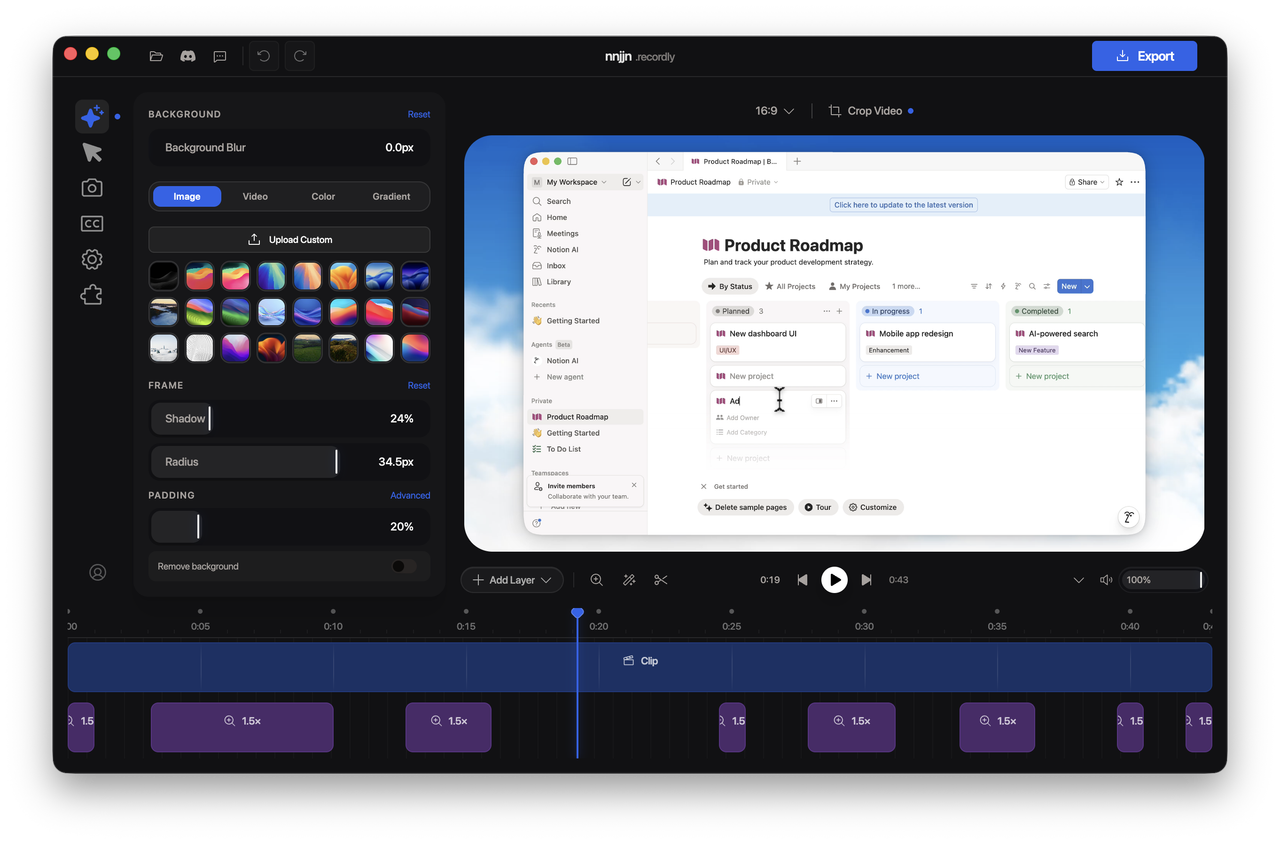
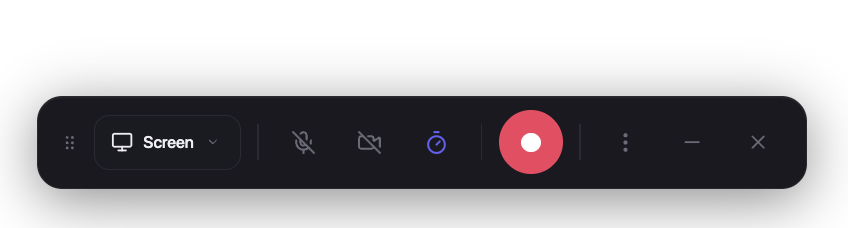
Screenshots and visual references Recordly’s interface is designed to be approachable yet feature-rich. The recording interface presents clear controls for selecting screens or windows, audio sources, and quick access to start/stop. The editor shows a timeline with zoom regions, annotations, and the webcam overlay layer. A separate timeline screenshot demonstrates the granular control available for zooms, trims, and speed regions.
- Recordly recording interface screenshot
- Recordly editor screenshot
- Recordly timeline screenshot
Installation: getting started quickly If you want to start using Recordly, you’ll find prebuilt releases available for download, with additional installation options for various ecosystems.
- Prebuilt releases: The official releases can be found at the project’s releases page, making it easy to install on supported systems.
Arch Linux / Manjaro (AUR)
- Install via yay from the AUR:
- yay -S recordly-bin
- The PKGBUILD, desktop entry, release synchronization, and optional local-from-source packaging live in the recordly-aur repository to keep release duties out of the main project.
- For maintainer contact and package update details, consult the AUR page or the associated repository.
Build from source Recordly can be built from source on macOS, Linux, and Windows. The process is straightforward but requires platform-specific prerequisites.
Prerequisites
- macOS: Xcode Command Line Tools (xcode-select --install)
- Linux (Ubuntu/Debian): sudo apt install build-essential cmake libx11-dev libxtst-dev libxrandr-dev libxt-dev
- Windows: Visual Studio 2022 (or Build Tools) with the C++ workload and CMake
Steps
- git clone https://github.com/webadderallorg/Recordly.git recordly
- cd recordly
- npm install
- npm run dev
For packaged builds
- npm run build
Target-specific build commands
- npm run build:mac
- npm run build:win
- npm run build:linux
macOS quarantine note Locally built macOS apps can be quarantined by the operating system. If you encounter the “App cannot be opened” message, remove the quarantine flag with:
- xattr -rd com.apple.quarantine /Applications/Recordly.app
System requirements, at a glance Recordly is designed to work across major desktop platforms, but some specifics are important to understand for the best results.
macOS
- Minimum: macOS 14.0 (Sonoma)
- Reason: ScreenCaptureKit audio and microphone capture rely on newer system capabilities
Windows
- Minimum: Windows 10 (20H1, Build 19041, May 2020)
- Reason: Native Windows Graphics Capture (WGC) and best cursor-hiding behavior
- Note: On older Windows builds, recording can still work via fallback capture, but the real system cursor may remain visible
Linux
- Any modern distribution
- Recording supported through Electron capture APIs
- System audio generally requires PipeWire for best results
Usage: how to record, edit, and export Recordly is designed to minimize context switching.
Recording
- Launch Recordly
- Select which screen or window to capture
- Choose microphone and system audio sources
- Start recording, narrate, and interact with the screen as needed
- Stop recording to automatically open the editor for immediate refinement
Editing in the editor
- Add trims to remove unwanted sections
- Apply zooms and speed adjustments to highlight key moments
- Insert annotations (text, image, or figure) to clarify concepts
- Fine-tune the cursor behavior and the audio levels
- Style the final frame with wallpapers, colors, gradients, blur, padding, and rounded corners
- Add or adjust webcam overlay footage
- Insert additional audio regions for ambient sound, narration, or effects
- Crop the produced frame and select an aspect ratio that fits your distribution channel
- Save the project as a .recordly file to preserve both source media and editor state
Export options
- MP4 export for standard video delivery
- GIF export for quick sharing and looping demonstrations
- Customize export quality, GIF frame rate, looping behavior, and output size
- Easily reveal the exported files in the system’s file manager
How It Works: the tech behind Recordly Recordly combines several layers to deliver a smooth, end-to-end workflow.
Capture
- The Electron-based app coordinates the recording process and the application flow
- macOS uses native ScreenCaptureKit helpers for efficient capture
- Windows relies on a native Windows Graphics Capture helper, with appropriate audio backends when available
- Linux relies on Electron’s capture mechanisms to support a broad range of distributions
Editing
- A renderer-driven editor applies cursor and webcam styling in the application’s editor state
- The timeline defines zoom regions, trims, and speed changes, while annotations and audio overlays enrich the narrative
- The same scene logic used in the live preview informs the final exports
Rendering
- PixiJS handles scene composition during preview and export, ensuring consistent visuals between on-screen previews and final MP4/GIF outputs
- The export stage uses the same rendering pipeline to produce high-quality MP4 or GIF files
Projects
- Each .recordly file stores the path to the source media plus the editor state, enabling seamless reopening and continued work
Contribution and community Recordly invites contributions from developers and creators who want to improve Linux capture, refine export performance and stability, polish UI/UX, expand localization, or add new editor tools and workflow improvements.
Contributing guidelines
- Focus PRs on specific improvements related to capture, editing, export, or UX
- Test end-to-end flows: recording, editing, and exporting
- Refrain from large, unrelated refactors in early PRs
- See CONTRIBUTING.md for detailed guidelines
Community and support Bug reports and feature requests can be filed on the project’s issue tracker. Contributions via pull requests are welcomed and encouraged, reflecting Recordly’s open-source ethos and commitment to ongoing collaboration.
Hall of supporters Recordly recognizes the generosity of its supporters. If you’d like to contribute, you can visit the Ko-fi page and learn how to help sustain development and cover hosting, maintenance, and future feature work.
- Ko‑fi badge link
- Tadees
- buildwithfur
- Tobias
- Anonymous Supporter
- Tandava Appadoo
- Digitalfastmind
- Roberto Marcelino
- Rajan RK
- Francesco
- Erwan
- Anonymous supporter
License and credits Recordly is released under the AGPL 3.0 license, ensuring continued collaboration and openness for all users and contributors. Acknowledgments note that Recordly originally began as a fork of OpenScreen and has since evolved with its own direction and features. The project is created by @webadderall, who continues to shepherd its development and engage with the community to refine and expand its capabilities.
Images and visual assets referenced in this post
- Recordly logo: https://i.postimg.cc/tRnL8gHp/Frame-5.png
- macOS/Windows/Linux badge: https://img.shields.io/badge/macOS%20%7C%20Windows%20%7C%20Linux-111827?style=for-the-badge
- AGPL license badge: https://img.shields.io/badge/open%20source-AGPL3.0-2563eb?style=for-the-badge
- Recordly cursor and zoom demo video:

- Recordly webcam overlay demo video:

- Recordly recording interface screenshot:
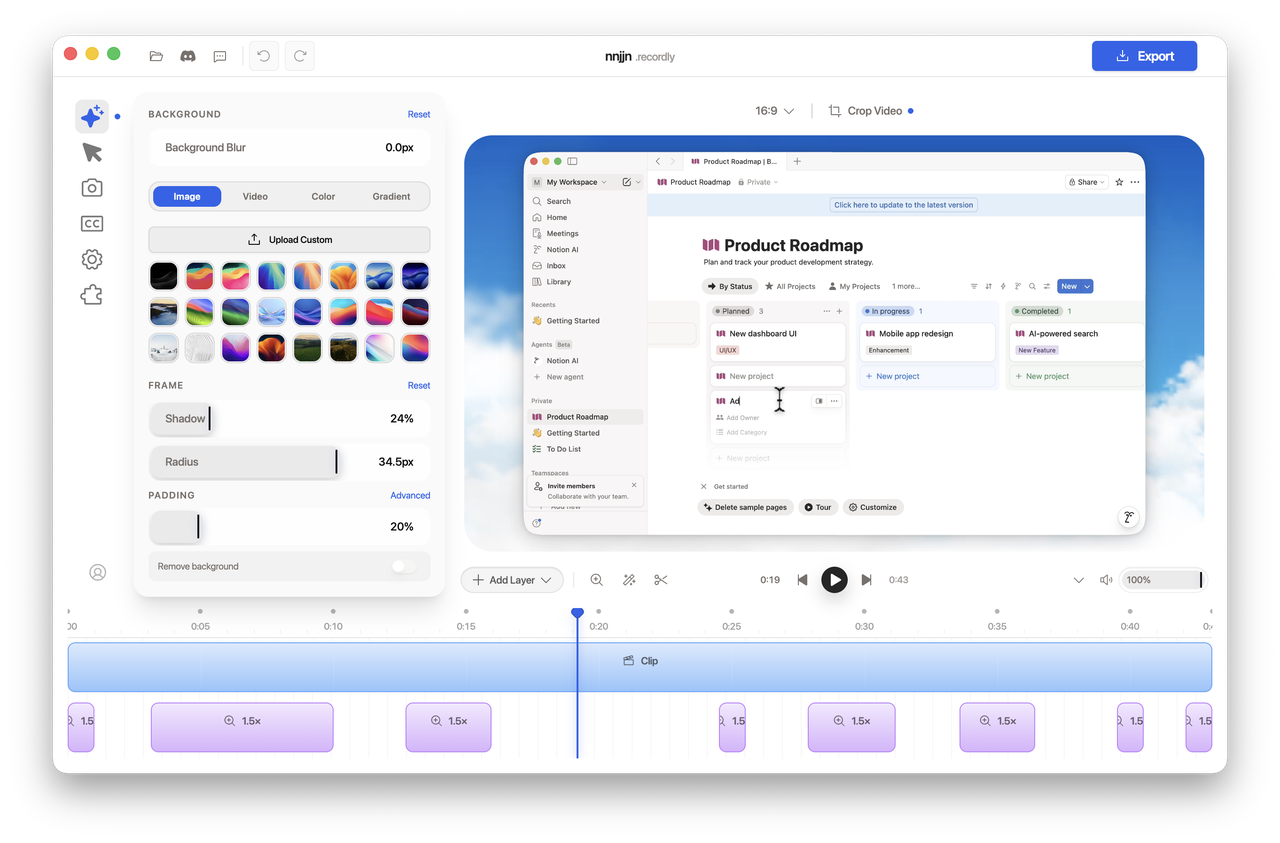
- Recordly editor screenshot:
- Recordly timeline screenshot:
Final thoughts Recordly positions itself as a comprehensive, open-source solution for modern screen recording and editing. By combining capture, editing, and rendering in a single application, it reduces the friction commonly associated with producing polished walkthroughs and product demos. The platform’s cross-platform approach, extensible architecture, and community-driven growth model align well with creators who value efficiency, transparency, and collaboration.
Whether you’re documenting a software feature, creating a training video, or building a library of repeatable demonstrations, Recordly offers a compelling workflow that can save time while delivering professional results. The project’s openness invites you to contribute—whether by refining capture on Linux, enhancing export performance, or expanding the marketplace of extensions that tailor the tool to specialized needs. If you’re looking for a free, capable, and collaborative screen recording and editing solution, Recordly is worth exploring.
Enjoying this project?
Discover more amazing open-source projects on TechLogHub. We curate the best developer tools and projects.
Repository:https://github.com/webadderallorg/Recordly
GitHub - webadderallorg/Recordly: Recordly
Recordly is an open-source screen recorder and editor designed to simplify the creation of walkthroughs, demos, product videos, and more. With built-in motion-d...
github - webadderallorg/recordly